































22
59
如何将文本转换为向量?(方法四)
2025-09-04 11:23:49
0点赞
0收藏
0评论
文本转换为向量有多种方式:
方法一:通过模型服务灵积DashScope将文本转换为向量(推荐)
方法二:通过ModelScope魔搭社区中的文本向量开源模型将文本转换为向量
方法三:通过Jina Embeddings v2模型将文本转换为向量
本文介绍方法四:如何通过百川智能向量化模型将文本转换为向量,并入库至向量检索服务DashVector中进行向量检索。
前提条件
DashVector:
已创建Cluster:创建Cluster
已获得API-KEY:API-KEY管理
已安装最新版SDK:安装DashVector SDK
百川智能:
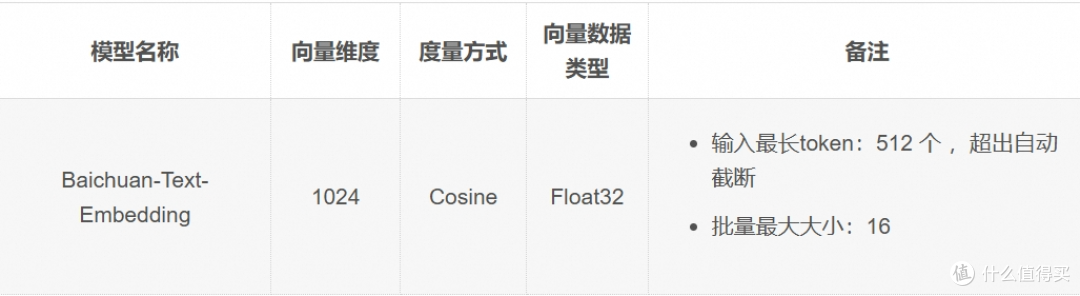
已获得API密钥:百川智能向量化模型
百川智能向量化模型
简介
说明
关于百川智能向量化模型更多信息请参考:百川智能向量化模型。
使用示例
说明
需要进行如下替换代码才能正常运行:
1. DashVector api-key替换示例中的{your-dashvector-api-key}
2. DashVector Cluster Endpoint替换示例中的{your-dashvector-cluster-endpoint}
3. 百川智能api-key替换示例中的{your-baichuan-api-key}
Python示例:
from dashvector import Client
import requests
from typing import List
# 调用百川智能向量化模型服务,将文本embedding为向量
def generate_embeddings(texts: List[str]):
headers = {
'Content-Type': 'application/json',
'Authorization': 'Bearer {your-baichuan-api-key}'
}
data = {'input': texts, 'model': 'Baichuan-Text-Embedding'}
response = requests.post('http://api.baichuan-ai.com/v1/embeddings', headers=headers, json=data)
return [record["embedding"] for record in response.json()["data"]]
# 创建DashVector Client
client = Client(
api_key='{your-dashvector-api-key}',
endpoint='{your-dashvector-cluster-endpoint}'
)
# 创建DashVector Collection
rsp = client.create('baichuan-text-embedding', 1024)
assert rsp
collection = client.get('baichuan-text-embedding')
assert collection
# 向量入库DashVector
collection.insert(
('ID1', generate_embeddings(['阿里云向量检索服务DashVector是性能、性价比具佳的向量数据库之一'])[0])
)
# 向量检索
docs = collection.query(
generate_embeddings(['The best vector database'])[0]
)
print(docs)
阿里云向量检索服务 DashVector 免费试用进行中,玩转大模型搜索,快来试试吧~
了解更多信息,请点击:https://www.aliyun.com/product/ai/dashvector