



























7
5
Qbittorrent 美化设置,更换响应式皮肤,更换彩色皮肤
2025-04-29 12:03:37
5点赞
41收藏
2评论
嘿,这里是「青柠炸机店」,完整Qb的知识安装设置教程,看这篇文章:👇️👇️👇️
很多小伙伴要问了,PT默认的皮肤就挺好的呀,为什么要换皮肤呢⁉️
这里我给大家解释一下,如果你要在移动端,比如:手机,Pad上面登录Qb,那么很遗憾,默认的Qb界面并不能很好的适配这些设备,那么这时候就需要一个具有响应式界面的皮肤,为我们在这些设备上面带来更好的体验。
其次,单调的默认皮肤,看久了也是无聊,可以给它点颜色see see
see
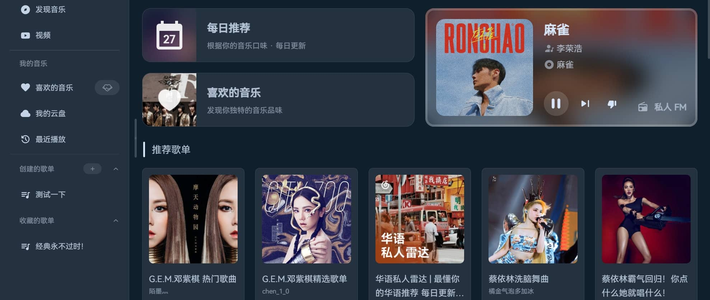
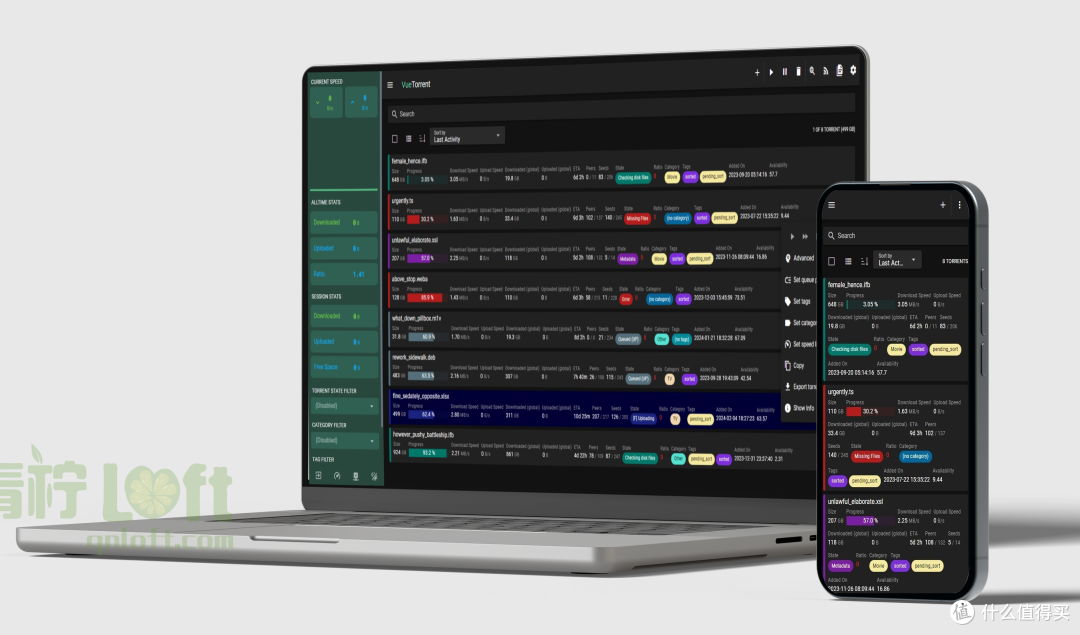
更换皮肤后的部分效果展示,如下图:
 VueTorrent
 Catppuccin
VueTorrent - 最华丽的 Qb 皮肤
VueTorrent 的优势是不仅可以使得 Qbittorrent 在web端,有一个美观的界面,同时还支持手机端的适配。但是它的安装,会遇到大坑,一定一定要细心,注意⚠️⚠️⚠️
安装和使用方式:
1️⃣ 下载皮肤文件,⏭[下载地址我放到评论区了]
2️⃣ 将皮肤文件上传装有飞牛的NAS中,并解压到如下目录,📣 保持目录结构如下图所示的样子:
看清我的目录结构,安装你自己的结构进行适当修改

3️⃣ 使用浏览器访问 Qbittorrent,在设置中找到 webUI,配置如下图:

4️⃣ 保存后页面会自动刷新,之后就可能看到效果了。
⚠️⚠️⚠️ 安装后可能遇到的问题 👇🏻👇🏻👇🏻
如果页面出现:`不可接受的文件类型,只允许使用常规文件`
遇事莫慌🤣,解决方式:需要先关闭Qbittorrent 的 Dokcer容器,然后将 /vol1/1000/docker/qbittorrent/config/qBittorrent/qBittorrent.conf (这里目录,根据NAS不同,可能会有所差异,有问题发评论区,我会一一解答)文件中的AlternativeUIEnabled 改为 false,删除 RootFolder 中的内容。修改后的文件如下:
WebUIAlternativeUIEnabled=false
WebUIRootFolder=
修改完成后,再启动Dokcer容器。
Catppuccin - 给Qb点颜色看看
Catppuccin 的安装方式比较特别,需要用到浏览器插件:Stylus,并且配置后,⚠️ 只是在当前电脑中生效,如果更换浏览器或者设备,就无法起到效果了 ‼️
1️⃣ 在 Chrome 中 搜索并安装浏览器插件 Stylus

2️⃣ 打开 Qbittorrent 网页,点击 刚刚安装好的 Stylus,点击 新建样式 给 xxx

3️⃣ 填入 😍喜欢的样式 代码,保存即可。

皮肤效果可以看这里:⏭ [Catppuccin项目地址 见评论区]
附上全部Catppuccin皮肤样式代码
👇🏻下面的皮肤样式,自行尝试,找到自己喜欢的。
# latte 皮肤
@import "https://theme-park.dev/css/base/qbittorrent/catppuccin-latte.css";
# frappe 皮肤
@import "https://theme-park.dev/css/base/qbittorrent/catppuccin-frappe.css";
# macchiato 皮肤
@import "https://theme-park.dev/css/base/qbittorrent/catppuccin-macchiato.css";
# mocha 皮肤
@import "https://theme-park.dev/css/base/qbittorrent/catppuccin-mocha.css";
# aquamarine 皮肤
@import "https://theme-park.dev/css/base/qbittorrent/aquamarine.css";
# hotline 皮肤
@import "https://theme-park.dev/css/base/qbittorrent/hotline.css";
# hotpink 皮肤
@import "https://theme-park.dev/css/base/qbittorrent/hotpink.css";
# dracula 皮肤
@import "https://theme-park.dev/css/base/qbittorrent/dracula.css";
# dark 皮肤
@import "https://theme-park.dev/css/base/qbittorrent/dark.css";
# organizr 皮肤
@import "https://theme-park.dev/css/base/qbittorrent/organizr.css";
# space-gray 皮肤
@import "https://theme-park.dev/css/base/qbittorrent/space-gray.css";
# overseerr 皮肤
@import "https://theme-park.dev/css/base/qbittorrent/overseerr.css";
# plex 皮肤
@import "https://theme-park.dev/css/base/qbittorrent/plex.css";
# maroon 皮肤
@import "https://theme-park.dev/css/base/qbittorrent/maroon.css";
作者声明本文无利益相关,欢迎值友理性交流,和谐讨论~











安装难度:⭐️⭐️⭐️⭐️☆
关注指数:⭐️⭐️☆
如果有你有手机📱访问Qb的需求,那么 VueTorrent 皮肤一定要试试,[项目地址](去看看)。Catppuccin 皮肤则是锦上添花的功能,[项目地址](去看看)
「🌟 探索NAS与迷你主机的无限可能,我是青柠🍈,致力于为你带来最前沿、最丰富的相关内容!快来关注我,一起开启智能生活新篇章!🚀」
校验提示文案
校验提示文案
校验提示文案
安装难度:⭐️⭐️⭐️⭐️☆
关注指数:⭐️⭐️☆
如果有你有手机📱访问Qb的需求,那么 VueTorrent 皮肤一定要试试,[项目地址](去看看)。Catppuccin 皮肤则是锦上添花的功能,[项目地址](去看看)
「🌟 探索NAS与迷你主机的无限可能,我是青柠🍈,致力于为你带来最前沿、最丰富的相关内容!快来关注我,一起开启智能生活新篇章!🚀」
校验提示文案