































11
33
ESXi7.0封装Intel I225V B3网卡驱动
2022-06-12 16:55:26
6点赞
41收藏
11评论

刚买了个最近很流行的N5105第三版4口软路由,双nvme,intel 2.5G网卡,看着不错。习惯性先上个当前最新的esxi 7.0u3d,然后尴尬了,居然没识别网卡,看了下这个2.5G网卡esxi默认不支持,需要安装社区版驱动,这里就简单记录下,其实方法和之前的《ESXi 封装I219V网卡驱动》差不多,只不过版本和驱动有点不一样。
0x10 准备工作
管理员权限打开powershell
安装工具
Install-Module -Name VMware.PowerCLI
更改策略
Set-ExecutionPolicy RemoteSigned
esxi的社区有很多爱好者在做各种各样的驱动兼容,这里要用的就是网卡驱动。
Net-Community-Driver_1.2.7.0-1vmw.700.1.0.15843807_19480755.zip
再看看esxi版本,这里选当前组新版7.0u3d:ESXi-7.0U3d-19482537-standard
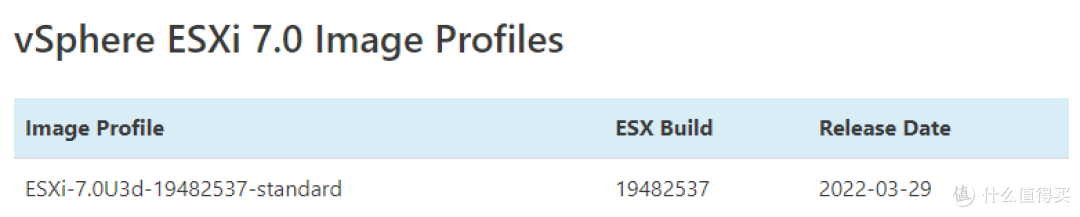
这次从本地进行打包,就不走在线的方式了,当前最新depot包:VMware-ESXi-7.0U3d-19482537-depot.zip
将系统包和驱动包都放到一个目录,比如 “d:ESXi”
0x20 打包镜像
在powershell执行
$esxiOfflineBundle = "VMware-ESXi-7.0U3d-19482537-depot.zip"
$netOfflineBundle = "Net-Community-Driver_1.2.7.0-1vmw.700.1.0.15843807_19480755.zip"
$baseProfile = "ESXi-7.0U3d-19482537-standard"
$newProfile = "ESXi-7.0U3d-19482537-i225"
$newVendor = "white-alone.com"
Add-EsxSoftwareDepot ."$esxiOfflineBundle"
Add-EsxSoftwareDepot ."$netOfflineBundle"
New-EsxImageProfile -CloneProfile "$baseProfile" -name "$newProfile" -Vendor $newVendor
Add-EsxSoftwarePackage -ImageProfile "$newProfile" -SoftwarePackage "net-community"
Export-ESXImageProfile -ImageProfile "$newProfile" -ExportToIso -filepath "$newProfile.iso"
Export-ESXImageProfile -ImageProfile "$newProfile" -ExportToBundle -filepath "$newProfile.zip"
这就打包好了集成了i225驱动的ESXi 7.0u3d的镜像了。

0x30 安装系统
然后就可以愉快的用iso安装或者用zip升级了。

作者声明本文无利益相关,欢迎值友理性交流,和谐讨论~











值友7981764640
首先对这个是不是原贴保持怀疑
其次对于其中的一些参数来源进行说明和扩展:
关于$baseProfile的值,在声明$esxiOfflineBundle之后,进行 Get-EsxImageProfile命令,查看所有可用的映像配置文件,$baseProfile的值应当为其中的一个,所以正确的变量声明顺序应为:声明$esxiOfflineBundle,声明$netOfflineBundle,声明$newVendor,运行Get-EsxImageProfile,声明$baseProfile,声明$newProfile。
校验提示文案
孤独小白
$netOfflineBundle = "Net-Community-Driver_1.2.7.0-1vmw.700.1.0.15843807_19480755.zip"
$baseProfile = "ESXi-7.0U3d-19482537-standard"
$newProfile = "ESXi-7.0U3d-19482537-i225"
$newVendor = "white-alone.com"
Add-EsxSoftwareDepot .\"$esxiOfflineBundle"
Add-EsxSoftwareDepot .\"$netOfflineBundle"
New-EsxImageProfile -CloneProfile "$baseProfile" -name "$newProfile" -Vendor $newVendor
Add-EsxSoftwarePackage -ImageProfile "$newProfile" -SoftwarePackage "net-community"
Export-ESXImageProfile -ImageProfile "$newProfile" -ExportToIso -filepath "$newProfile.iso"
Export-ESXImageProfile -ImageProfile "$newProfile" -ExportToBundle -filepath "$newProfile.zip"
校验提示文案
海鲜大排档
校验提示文案
小冬瓜
校验提示文案
春夏秋冬pp
校验提示文案
p桑花啊
校验提示文案
真的该剁手
校验提示文案
值友3905807755
校验提示文案
大伙都夸我帅
PS D:\ESXi> Add-EsxSoftwareDepot .\"$esxiOfflineBundle"
Add-EsxSoftwareDepot : Failed to initialize the VMware.ImageBuilder PowerCLI module because of error: Unsupported Pytho
n version. VMware.ImageBuilder supports Python 3.7.1 executable_path>. See the PowerCLI Compatibility Matrixes for information on the Py
thon requirements.
所在位置 行:1 字符: 1
+ Add-EsxSoftwareDepot .\"$esxiOfflineBundle"
+ ~~~~~~~~~~~~~~~~~~~~~~~~~~~~~~~~~~~~~~~~~~~
+ CategoryInfo : NotSpecified: (:) [Add-EsxSoftwareDepot], Exception
+ FullyQualifiedErrorId : System.Exception,VMware.ImageBuilder.Commands.AddDepot
校验提示文案
值友5975929173
校验提示文案
值友7981764640
首先对这个是不是原贴保持怀疑
其次对于其中的一些参数来源进行说明和扩展:
关于$baseProfile的值,在声明$esxiOfflineBundle之后,进行 Get-EsxImageProfile命令,查看所有可用的映像配置文件,$baseProfile的值应当为其中的一个,所以正确的变量声明顺序应为:声明$esxiOfflineBundle,声明$netOfflineBundle,声明$newVendor,运行Get-EsxImageProfile,声明$baseProfile,声明$newProfile。
校验提示文案
值友5975929173
校验提示文案
大伙都夸我帅
PS D:\ESXi> Add-EsxSoftwareDepot .\"$esxiOfflineBundle"
Add-EsxSoftwareDepot : Failed to initialize the VMware.ImageBuilder PowerCLI module because of error: Unsupported Pytho
n version. VMware.ImageBuilder supports Python 3.7.1 executable_path>. See the PowerCLI Compatibility Matrixes for information on the Py
thon requirements.
所在位置 行:1 字符: 1
+ Add-EsxSoftwareDepot .\"$esxiOfflineBundle"
+ ~~~~~~~~~~~~~~~~~~~~~~~~~~~~~~~~~~~~~~~~~~~
+ CategoryInfo : NotSpecified: (:) [Add-EsxSoftwareDepot], Exception
+ FullyQualifiedErrorId : System.Exception,VMware.ImageBuilder.Commands.AddDepot
校验提示文案
值友3905807755
校验提示文案
真的该剁手
校验提示文案
p桑花啊
校验提示文案
春夏秋冬pp
校验提示文案
小冬瓜
校验提示文案
海鲜大排档
校验提示文案
孤独小白
$netOfflineBundle = "Net-Community-Driver_1.2.7.0-1vmw.700.1.0.15843807_19480755.zip"
$baseProfile = "ESXi-7.0U3d-19482537-standard"
$newProfile = "ESXi-7.0U3d-19482537-i225"
$newVendor = "white-alone.com"
Add-EsxSoftwareDepot .\"$esxiOfflineBundle"
Add-EsxSoftwareDepot .\"$netOfflineBundle"
New-EsxImageProfile -CloneProfile "$baseProfile" -name "$newProfile" -Vendor $newVendor
Add-EsxSoftwarePackage -ImageProfile "$newProfile" -SoftwarePackage "net-community"
Export-ESXImageProfile -ImageProfile "$newProfile" -ExportToIso -filepath "$newProfile.iso"
Export-ESXImageProfile -ImageProfile "$newProfile" -ExportToBundle -filepath "$newProfile.zip"
校验提示文案