

















17
20
让小爱同学帮我量身高
2025-05-13 23:03:54
1点赞
0收藏
0评论
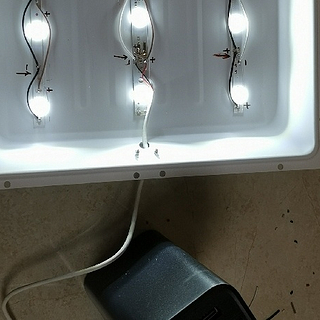
因受到anduony量身高文章的启发(下面有链接),想起自己手上还有块限制的LD2410,并且已经通过esphome接入了HA,所以尝试去做了一个身高检测功能。
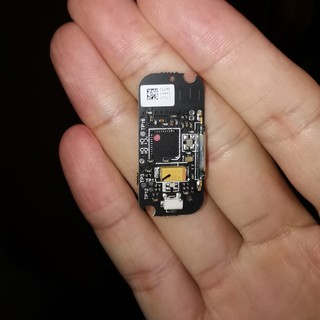
软硬件条件:LD2410,通过E103-W01,刷写了ESPHOME的固件接入了HA。客厅小爱同学pro,通过xiaomi miot auto接入HA,node-red,里面配置好小爱同学子流程。
这里暂时不讨论硬件制作及接入HA的方式, 测量思路与anduony类似,将LD2410安装到天花板上,通电后HA当中会获得很多的数据,最重要的一条是still distance,这个就只雷达到头顶的距离,只要用安装高度-still distance就是身高了。


nord-red程序思路大概这样:

1.在HA中有个sensor.xiaomi_***_conversation的实体,在跟小爱同学对话后会将对话内容传递到这里,如果这个数据等于“身高”、“量身高”等几个指定口令的时候,开始触发整个流程。
2.播报提醒用户站好,正在测量,同时将xunhuan、shengao两个局部变量定义下来。
3.循环10次,从sensor.ld2410b2_still_distance中获取距离数据,10迭代,获取其中最小的数据。
4.计算身高=安装高度-最小数据值,然后播报身高即可
流程代码如下,可以复制直接导入,然后修改上述两个蓝色的实体为你自己那边的实体。
[
{
"id": "263174d5426cec3f",
"type": "xiaoai-tts-configurator",
"name": "客厅小爱pro"
},
{
"id": "2fbc7be4bb222c42",
"type": "server-state-changed",
"z": "5d32119b0abec7e8",
"name": "小爱语音指令",
"server": "3d795e14a76267de",
"version": 4,
"exposeToHomeAssistant": false,
"haConfig": [
{
"property": "name",
"value": ""
},
{
"property": "icon",
"value": ""
}
],
"entityidfilter": "sensor.xiaomi_lx06_e62f_conversation",
"entityidfiltertype": "exact",
"outputinitially": false,
"state_type": "str",
"haltifstate": "身高,量身高,帮我量一下身高",
"halt_if_type": "str",
"halt_if_compare": "includes",
"outputs": 2,
"output_only_on_state_change": true,
"for": "0",
"forType": "num",
"forUnits": "minutes",
"ignorePrevStateNull": false,
"ignorePrevStateUnknown": false,
"ignorePrevStateUnavailable": false,
"ignoreCurrentStateUnknown": false,
"ignoreCurrentStateUnavailable": false,
"outputProperties": [
{
"property": "payload",
"propertyType": "msg",
"value": "",
"valueType": "entityState"
},
{
"property": "data",
"propertyType": "msg",
"value": "",
"valueType": "eventData"
},
{
"property": "topic",
"propertyType": "msg",
"value": "",
"valueType": "triggerId"
}
],
"x": 150,
"y": 780,
"wires": [
[
"aa5d9cbb8fbca122"
],
[]
]
},
{
"id": "053df8467ad35047",
"type": "api-current-state",
"z": "5d32119b0abec7e8",
"name": "雷达参数",
"server": "3d795e14a76267de",
"version": 3,
"outputs": 1,
"halt_if": "",
"halt_if_type": "num",
"halt_if_compare": "is",
"entity_id": "sensor.ld2410b2_still_distance",
"state_type": "num",
"blockInputOverrides": false,
"outputProperties": [
{
"property": "payload",
"propertyType": "msg",
"value": "",
"valueType": "entityState"
},
{
"property": "data",
"propertyType": "msg",
"value": "",
"valueType": "entity"
}
],
"for": "0",
"forType": "num",
"forUnits": "minutes",
"override_topic": false,
"state_location": "payload",
"override_payload": "msg",
"entity_location": "data",
"override_data": "msg",
"x": 1000,
"y": 780,
"wires": [
[
"1feacd8fe2f6894b",
"40315f2d2c7effaf"
]
]
},
{
"id": "791205120bbce9f9",
"type": "change",
"z": "5d32119b0abec7e8",
"name": "数据处理",
"rules": [
{
"t": "move",
"p": "payload",
"pt": "msg",
"to": "shengao",
"tot": "msg"
}
],
"action": "",
"property": "",
"from": "",
"to": "",
"reg": false,
"x": 1180,
"y": 840,
"wires": [
[
"b9952caccf198a0c"
]
]
},
{
"id": "b9952caccf198a0c",
"type": "function",
"z": "5d32119b0abec7e8",
"name": "播报内容",
"func": "msg.payload =n`你的身高是${msg.shengao}n厘米n`nreturn msg;",
"outputs": 1,
"timeout": "",
"noerr": 0,
"initialize": "",
"finalize": "",
"libs": [],
"x": 1360,
"y": 840,
"wires": [
[
"bfe4df38bd50de47"
]
]
},
{
"id": "bfe4df38bd50de47",
"type": "subflow:45c8cac9351a4f98",
"z": "5d32119b0abec7e8",
"name": "客厅小爱",
"x": 1540,
"y": 840,
"wires": [
[]
]
},
{
"id": "aa5d9cbb8fbca122",
"type": "function",
"z": "5d32119b0abec7e8",
"name": "播送内容",
"func": "msg.payload =n`请站好保持不动,正在测量,坚持10秒钟就好了。n`nreturn msg;",
"outputs": 1,
"timeout": "",
"noerr": 0,
"initialize": "",
"finalize": "",
"libs": [],
"x": 340,
"y": 780,
"wires": [
[
"4fd3e25fe07f1933"
]
]
},
{
"id": "4fd3e25fe07f1933",
"type": "subflow:45c8cac9351a4f98",
"z": "5d32119b0abec7e8",
"name": "客厅小爱",
"x": 500,
"y": 780,
"wires": [
[
"d9ccd6884bcaaebc"
]
]
},
{
"id": "95db8016455ae6b0",
"type": "function",
"z": "5d32119b0abec7e8",
"name": "计算身高",
"func": "var my_shengao=flow.get("shengao");nmy_shengao=258-my_shengao;//258是我的安装高度,这里需要自己按实际情况调整nmsg.payload=my_shengao;nreturn msg;n",
"outputs": 1,
"timeout": "",
"noerr": 0,
"initialize": "",
"finalize": "",
"libs": [],
"x": 1000,
"y": 840,
"wires": [
[
"791205120bbce9f9",
"53bb457ffefee535"
]
]
},
{
"id": "1feacd8fe2f6894b",
"type": "debug",
"z": "5d32119b0abec7e8",
"name": "debug 4",
"active": true,
"tosidebar": true,
"console": false,
"tostatus": true,
"complete": "payload",
"targetType": "msg",
"statusVal": "payload",
"statusType": "auto",
"x": 1000,
"y": 700,
"wires": []
},
{
"id": "53bb457ffefee535",
"type": "debug",
"z": "5d32119b0abec7e8",
"name": "debug 5",
"active": true,
"tosidebar": true,
"console": false,
"tostatus": true,
"complete": "payload",
"targetType": "msg",
"statusVal": "payload",
"statusType": "auto",
"x": 1000,
"y": 920,
"wires": []
},
{
"id": "18328aaa42ad683f",
"type": "switch",
"z": "5d32119b0abec7e8",
"name": "循环10次",
"property": "xunhuan",
"propertyType": "flow",
"rules": [
{
"t": "lte",
"v": "10",
"vt": "num"
},
{
"t": "gt",
"v": "10",
"vt": "num"
}
],
"checkall": "true",
"repair": false,
"outputs": 2,
"x": 820,
"y": 780,
"wires": [
[
"053df8467ad35047"
],
[
"95db8016455ae6b0"
]
]
},
{
"id": "dc891acb57d295b9",
"type": "delay",
"z": "5d32119b0abec7e8",
"name": "延迟",
"pauseType": "delay",
"timeout": "800",
"timeoutUnits": "milliseconds",
"rate": "1",
"nbRateUnits": "1",
"rateUnits": "second",
"randomFirst": "1",
"randomLast": "5",
"randomUnits": "seconds",
"drop": false,
"allowrate": false,
"outputs": 1,
"x": 1390,
"y": 780,
"wires": [
[
"18328aaa42ad683f"
]
]
},
{
"id": "d9ccd6884bcaaebc",
"type": "function",
"z": "5d32119b0abec7e8",
"name": "初始化",
"func": "//初始化,将循坏为1身高为300nflow.set("xunhuan",1);nflow.set("shengao",300);nreturn msg;",
"outputs": 1,
"timeout": "",
"noerr": 0,
"initialize": "",
"finalize": "",
"libs": [],
"x": 650,
"y": 780,
"wires": [
[
"18328aaa42ad683f"
]
]
},
{
"id": "40315f2d2c7effaf",
"type": "function",
"z": "5d32119b0abec7e8",
"name": "获取10次最高值",
"func": "//与上一次数据进行比较,取较小值nvar my_shengao=flow.get("shengao");nif(my_shengao>=msg.payload)n{n my_shengao=msg.payload;n}nflow.set("shengao",my_shengao);n//循环加1nvar my_xunhuan=flow.get("xunhuan");nmy_xunhuan++;nflow.set("xunhuan",my_xunhuan);nmsg.payload=my_shengao;nreturn msg;n",
"outputs": 1,
"timeout": 0,
"noerr": 0,
"initialize": "",
"finalize": "",
"libs": [],
"x": 1200,
"y": 780,
"wires": [
[
"dc891acb57d295b9",
"7f20438000babe91"
]
]
},
{
"id": "7f20438000babe91",
"type": "debug",
"z": "5d32119b0abec7e8",
"name": "debug 7",
"active": true,
"tosidebar": true,
"console": false,
"tostatus": true,
"complete": "payload",
"targetType": "msg",
"statusVal": "payload",
"statusType": "auto",
"x": 1200,
"y": 700,
"wires": []
},
{
"id": "3d795e14a76267de",
"type": "server",
"name": "Home Assistant",
"version": 5,
"addon": false,
"rejectUnauthorizedCerts": true,
"ha_boolean": "y|yes|true|on|home|open",
"connectionDelay": true,
"cacheJson": true,
"heartbeat": false,
"heartbeatInterval": "30",
"areaSelector": "friendlyName",
"deviceSelector": "friendlyName",
"entitySelector": "friendlyName",
"statusSeparator": ": ",
"statusYear": "hidden",
"statusMonth": "short",
"statusDay": "numeric",
"statusHourCycle": "default",
"statusTimeFormat": "h:m",
"enableGlobalContextStore": false
}
]
到这里大概就能以通过唤醒小爱同学,通过“身高”、“量身高”等指令来测量身高了。但是你会发现小爱会乱答你的指令,所以这里最好还是在米家给小爱同学建立几个个人训练,如下图。
目前也还有个缺陷,及时连续两次相同的指令无法触发,只能轮流来,比如第一次说“身高”,第二次说“量身高”,第三次说“身高”,以此类推。

作者声明本文无利益相关,欢迎值友理性交流,和谐讨论~