











 深耕数码、AI兴趣领域






22
59
大数据时代如何保护自己的隐私?NAS部署『PrivateBin』
2024-12-13 16:42:37
9点赞
17收藏
6评论
大数据时代如何保护自己的隐私?NAS部署极简安全的在线粘贴板『PrivateBin』
哈喽小伙伴们好,我是Stark-C~
在这个大数据时代,很多人在不知情的情况下就暴露了自己的隐私,就比如说在日常社交媒体对话聊天中,自己发出去的信息或者图片可能就已经被不法分子截取了。这种状况不仅影响了个人的安全感,还可能导致各种潜在的危害,如身份盗窃、网络欺诈和不必要的商业营销骚扰等。
今天就为大家分享一个安全和私密的文本分享工具『PrivateBin』,非常适合临时分享文本文档,或者需要一个快速且私密的交流方式,这个项目可能就是你需要的。
关于PrivateBin

🔺PrivateBin 是一个开源的在线文本粘贴工具,它的设计初衷就是提供一个安全、简便和匿名的信息共享平台,所以安全性还是非常可靠得,再加上它还支持私有化部署,让我们自己享有控制权,隐私也进一步加强。
PrivateBin 最大特点是它的数据加密方式,除了可以匿名分享,它所有数据都会在用户的浏览器中进行 AES-256 加密和解密,这就意味着在传输过程中,数据是完全私密和不可访问的。无论是你存储的信息还是分享的链接,PrivateBin 本身都无法读取这些数据,这就确保了用户的隐私。
PrivateBin的界面非常的友好简单,但功能却很实用,除了支持文本内容直接复制粘贴,还支持图片/影视/PDF上传,Markdown 语法的粘贴与预览,最主要的是,它还支持阅后即焚以及自定义时间,时间从最短5分钟到最长一个月。
对了,它还有自己的Demo预览地址:https://privatebin.net/ ,小伙伴们部署之前可以先行体验!
PrivateBin部署

🔺打开极空间的文件管理器(个人空间),在Docker目录下新建一个“privatebin”文件夹。

🔺然后在“privatebin”文件夹“新建文本文档”,并打开。

🔺将以下内容全部复制粘贴到文本文档内后“保存”,几乎没有什么修改的地方(其实是我不懂怎么修改~~)
;<?php http_response_code(403); /*
; config file for PrivateBin
;
; An explanation of each setting can be find online at https://github.com/PrivateBin/PrivateBin/wiki/Configuration.
[main]
; (optional) set a project name to be displayed on the website
; name = "PrivateBin"
; The full URL, with the domain name and directories that point to the
; PrivateBin files, including an ending slash (/). This URL is essential to
; allow Opengraph images to be displayed on social networks.
; basepath = "https://privatebin.example.com/"
; enable or disable the discussion feature, defaults to true
discussion = true
; preselect the discussion feature, defaults to false
opendiscussion = false
; enable or disable the display of dates & times in the comments, defaults to true
; Note that internally the creation time will still get tracked in order to sort
; the comments by creation time, but you can choose not to display them.
; discussiondatedisplay = false
; enable or disable the password feature, defaults to true
password = true
; enable or disable the file upload feature, defaults to false
fileupload = true
; preselect the burn-after-reading feature, defaults to false
burnafterreadingselected = false
; which display mode to preselect by default, defaults to "plaintext"
; make sure the value exists in [formatter_options]
defaultformatter = "plaintext"
; (optional) set a syntax highlighting theme, as found in css/prettify/
; syntaxhighlightingtheme = "sons-of-obsidian"
; size limit per paste or comment in bytes, defaults to 10 Mebibytes
sizelimit = 10485760
; template to include, default is "bootstrap" (tpl/bootstrap.php), also
; available are "page" (tpl/page.php), the classic ZeroBin style and several
; bootstrap variants: "bootstrap-dark", "bootstrap-compact", "bootstrap-page",
; which can be combined with "-dark" and "-compact" for "bootstrap-dark-page"
; and finally "bootstrap-compact-page" - previews at:
; https://privatebin.info/screenshots.html
template = "bootstrap"
; (optional) info text to display
; use single, instead of double quotes for HTML attributes
;info = "More information on the project page."
; (optional) notice to display
; notice = "Note: This is a test service: Data may be deleted anytime. Kittens will die if you abuse this service."
; by default PrivateBin will guess the visitors language based on the browsers
; settings. Optionally you can enable the language selection menu, which uses
; a session cookie to store the choice until the browser is closed.
languageselection = false
; set the language your installs defaults to, defaults to English
; if this is set and language selection is disabled, this will be the only language
; languagedefault = "cn"
; (optional) URL shortener address to offer after a new paste is created.
; It is suggested to only use this with self-hosted shorteners as this will leak
; the pastes encryption key.
; urlshortener = "https://shortener.example.com/api?link="
; (optional) Let users create a QR code for sharing the paste URL with one click.
; It works both when a new paste is created and when you view a paste.
; qrcode = true
; (optional) Let users send an email sharing the paste URL with one click.
; It works both when a new paste is created and when you view a paste.
; email = true
; (optional) IP based icons are a weak mechanism to detect if a comment was from
; a different user when the same username was used in a comment. It might get
; used to get the IP of a comment poster if the server salt is leaked and a
; SHA512 HMAC rainbow table is generated for all (relevant) IPs.
; Can be set to one these values:
; "none" / "identicon" (default) / "jdenticon" / "vizhash".
; icon = "none"
; Content Security Policy headers allow a website to restrict what sources are
; allowed to be accessed in its context. You need to change this if you added
; custom scripts from third-party domains to your templates, e.g. tracking
; scripts or run your site behind certain DDoS-protection services.
; Check the documentation at https://content-security-policy.com/
; Notes:
; - If you use any bootstrap theme, you can remove the allow-popups from the
; sandbox restrictions.
; - If you use the bootstrap5 theme, you must change default-src to 'self' to
; enable display of the svg icons
; - By default this disallows to load images from third-party servers, e.g. when
; they are embedded in pastes. If you wish to allow that, you can adjust the
; policy here. See https://github.com/PrivateBin/PrivateBin/wiki/FAQ#why-does-not-it-load-embedded-images
; for details.
; - The 'wasm-unsafe-eval' is used to enable webassembly support (used for zlib
; compression). You can remove it if compression doesn't need to be supported.
; cspheader = "default-src 'none'; base-uri 'self'; form-action 'none'; manifest-src 'self'; connect-src * blob:; script-src 'self' 'wasm-unsafe-eval'; style-src 'self'; font-src 'self'; frame-ancestors 'none'; img-src 'self' data: https:; media-src blob:; object-src blob:; sandbox allow-same-origin allow-scripts allow-forms allow-popups allow-modals allow-downloads"
; stay compatible with PrivateBin Alpha 0.19, less secure
; if enabled will use base64.js version 1.7 instead of 2.1.9 and sha1 instead of
; sha256 in HMAC for the deletion token
; zerobincompatibility = false
; Enable or disable the warning message when the site is served over an insecure
; connection (insecure HTTP instead of HTTPS), defaults to true.
; Secure transport methods like Tor and I2P domains are automatically whitelisted.
; It is **strongly discouraged** to disable this.
; See https://github.com/PrivateBin/PrivateBin/wiki/FAQ#why-does-it-show-me-an-error-about-an-insecure-connection for more information.
; httpwarning = true
; Pick compression algorithm or disable it. Only applies to pastes/comments
; created after changing the setting.
; Can be set to one these values: "none" / "zlib" (default).
; compression = "zlib"
[expire]
; expire value that is selected per default
; make sure the value exists in [expire_options]
default = "1week"
[expire_options]
; Set each one of these to the number of seconds in the expiration period,
; or 0 if it should never expire
5min = 300
10min = 600
1hour = 3600
1day = 86400
1week = 604800
; Well this is not *exactly* one month, it's 30 days:
1month = 2592000
1year = 31536000
never = 0
[formatter_options]
; Set available formatters, their order and their labels
plaintext = "Plain Text"
syntaxhighlighting = "Source Code"
markdown = "Markdown"
[traffic]
; time limit between calls from the same IP address in seconds
; Set this to 0 to disable rate limiting.
limit = 10
; (optional) Set IPs addresses (v4 or v6) or subnets (CIDR) which are exempted
; from the rate-limit. Invalid IPs will be ignored. If multiple values are to
; be exempted, the list needs to be comma separated. Leave unset to disable
; exemptions.
; exempted = "1.2.3.4,10.10.10/24"
; (optional) If you want only some source IP addresses (v4 or v6) or subnets
; (CIDR) to be allowed to create pastes, set these here. Invalid IPs will be
; ignored. If multiple values are to be exempted, the list needs to be comma
; separated. Leave unset to allow anyone to create pastes.
; creators = "1.2.3.4,10.10.10/24"
; (optional) if your website runs behind a reverse proxy or load balancer,
; set the HTTP header containing the visitors IP address, i.e. X_FORWARDED_FOR
; header = "X_FORWARDED_FOR"
[purge]
; minimum time limit between two purgings of expired pastes, it is only
; triggered when pastes are created
; Set this to 0 to run a purge every time a paste is created.
limit = 300
; maximum amount of expired pastes to delete in one purge
; Set this to 0 to disable purging. Set it higher, if you are running a large
; site
batchsize = 10
[model]
; name of data model class to load and directory for storage
; the default model "Filesystem" stores everything in the filesystem
class = Filesystem
[model_options]
dir = PATH "data"
;[model]
; example of a Google Cloud Storage configuration
;class = GoogleCloudStorage
;[model_options]
;bucket = "my-private-bin"
;prefix = "pastes"
;uniformacl = false
;[model]
; example of DB configuration for MySQL
;class = Database
;[model_options]
;dsn = "mysql:host=localhost;dbname=privatebin;charset=UTF8"
;tbl = "privatebin_" ; table prefix
;usr = "privatebin"
;pwd = "Z3r0P4ss"
;opt[12] = true ; PDO::ATTR_PERSISTENT
;[model]
; example of DB configuration for SQLite
;class = Database
;[model_options]
;dsn = "sqlite:" PATH "data/db.sq3"
;usr = null
;pwd = null
;opt[12] = true ; PDO::ATTR_PERSISTENT
;[model]
; example of DB configuration for PostgreSQL
;class = Database
;[model_options]
;dsn = "pgsql:host=localhost;dbname=privatebin"
;tbl = "privatebin_" ; table prefix
;usr = "privatebin"
;pwd = "Z3r0P4ss"
;opt[12] = true ; PDO::ATTR_PERSISTENT
;[model]
; example of S3 configuration for Rados gateway / CEPH
;class = S3Storage
;[model_options]
;region = ""
;version = "2006-03-01"
;endpoint = "https://s3.my-ceph.invalid"
;use_path_style_endpoint = true
;bucket = "my-bucket"
;accesskey = "my-rados-user"
;secretkey = "my-rados-pass"
;[model]
; example of S3 configuration for AWS
;class = S3Storage
;[model_options]
;region = "eu-central-1"
;version = "latest"
;bucket = "my-bucket"
;accesskey = "access key id"
;secretkey = "secret access key"
;[model]
; example of S3 configuration for AWS using its SDK default credential provider chain
; if relying on environment variables, the AWS SDK will look for the following:
; - AWS_ACCESS_KEY_ID
; - AWS_SECRET_ACCESS_KEY
; - AWS_SESSION_TOKEN (if needed)
; for more details, see https://docs.aws.amazon.com/sdk-for-php/v3/developer-guide/guide_credentials.html#default-credential-chain
;class = S3Storage
;[model_options]
;region = "eu-central-1"
;version = "latest"
;bucket = "my-bucket"
;[yourls]
; When using YOURLS as a "urlshortener" config item:
; - By default, "urlshortener" will point to the YOURLS API URL, with or without
; credentials, and will be visible in public on the PrivateBin web page.
; Only use this if you allow short URL creation without credentials.
; - Alternatively, using the parameters in this section ("signature" and
; "apiurl"), "urlshortener" needs to point to the base URL of your PrivateBin
; instance with "?shortenviayourls&link=" appended. For example:
; urlshortener = "${basepath}?shortenviayourls&link="
; This URL will in turn call YOURLS on the server side, using the URL from
; "apiurl" and the "access signature" from the "signature" parameters below.
; (optional) the "signature" (access key) issued by YOURLS for the using account
; signature = ""
; (optional) the URL of the YOURLS API, called to shorten a PrivateBin URL
; apiurl = "https://yourls.example.com/yourls-api.php"
;[sri]
; Subresource integrity (SRI) hashes used in template files. Uncomment and set
; these for all js files used. See:
; https://github.com/PrivateBin/PrivateBin/wiki/FAQ#user-content-how-to-make-privatebin-work-when-i-have-changed-some-javascript-files
;js/privatebin.js = "sha512-[…]"
🔺之后将文本文档重命名为“conf.php”(请注意后缀也必须和我的一样)。

🔺此项目因为需要给文件夹授权,所以咱们直接启用极空间的SSH,然后使用命令部署更方便。极空间的SSH开启位置在“系统设置--远程协助/SSH”。开启之后还需要使用SSH终端工具连接到极空间,具体的连接方案请看我之前极空间SSH教程的专题介绍,里面也包括关于路径映射的讲解,稍后都会用到。
链接:https://post.smzdm.com/p/aqqz4ldx/

🔺连接成功之后,需要输入命令“sudo -i”,再输入一遍管理员的密码(输入密码没有显示,输入完成直接回车即可),切换到root账户(提升操作权限)。
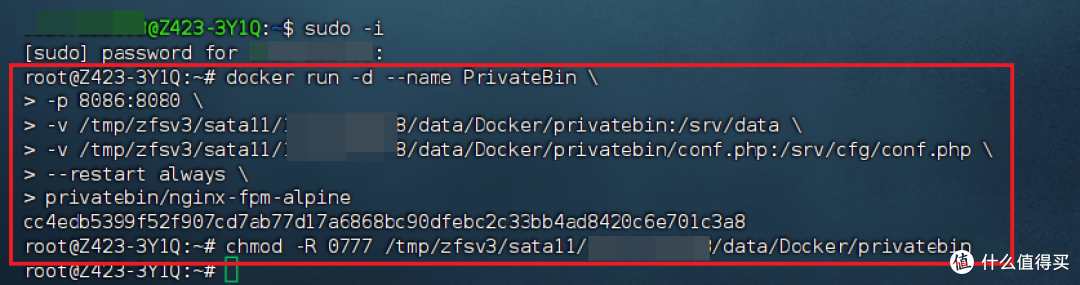
🔺然后输入以下命令:
docker run -d --name PrivateBin
-p 8086:8080
-v /Docker/privatebin:/srv/data
-v /Docker/privatebin/conf.php:/srv/cfg/conf.php
--restart always
privatebin/nginx-fpm-alpine
chmod -R 0777 /Docker
以下是你那边需要更改的说明,对照图中我给出的命令格式,请勿直接抄作业:
-p 8086:8080 -->冒号前面端口不要和本地冲突
-v /Docker/privatebin:/srv/data -->冒号映射privatebin文件夹的实际路径
-v /Docker/privatebin/conf.php:/srv/cfg/conf.php -->冒号映射conf.php文件的实际路径
chmod -R 0777 /Docker/privatebin -->赋予privatebin文件夹所有用户读、写和执行权限,还是注意privatebin文件夹的实际路径
另外就是因为众所周知的原因,目前国内的Docker镜像拉取已经抽风...,这个是和极空间设备无关的。如果遇到Docker镜像拉取问题,可以百度“国内可用Docker镜像加速器”获取最新加速镜像站,或者一劳永逸的科学搞定网络问题。

🔺完成以上之后看到容器显示“运行中”,就说明可以使用了。
PrivateBin体验
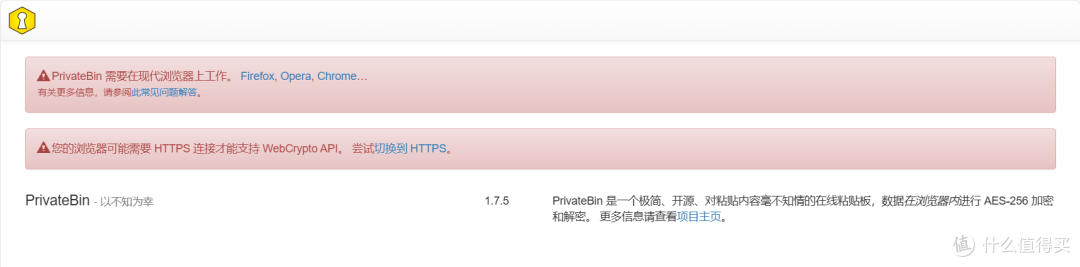
🔺PrivateBin打开的方式比较特别,如果你和之前一样直接【IP:端口】打开,就会出现上图中的提示,它需要我们以HTTPS连接才能打开。

🔺想要解决这个问题也非常简单,我们只需要在NAS中安装好Lucky,然后将PrivateBin项目做一个反向代理就可以了。关于极空间上Lucky的部署和用法我之前也出过详细教程,不知道的可以参考下:

🔺搞定之后我们就可以使用反向代理的链接打开项目主页了,可以看到它的页面确实够简洁,并且原生支持中文,我这里随手复制粘贴了我这篇文章的Markdown格式文件,中文显示没有问题。

🔺支持文本预览。

🔺也支持Markdown格式预览,但不知道为什么图片没有显示出来,估计应该是需要修改conf.php文件某个地方。

🔺可以设置有效期,最短5分钟,最长永不过期,或者直接设置阅后即焚,还能设置密码。搞定之后点“创建”。

🔺这样就得到一个以我们自己设置的反代链接为主链接的地址,复制这个地址就可以分享出去了。

🔺因为我设置了密码,所以当分享的这个链接被点开的时候需要输入密码,同时它也提示了文档的过期时间。

🔺打开之后就能看到链接分享过来的内容了。

🔺同时它也支持分享附件,附件可以是图片,办公文件,或者是小短片,我这里尝试发送一个6M的图片。

🔺打开之后图片可以直接显示出来,并且还可以直接下载。

🔺另外它对Docker Compose的代码支持的也非常完美,前提是需要使用源代码模式,我以后就用这个给粉丝分享Docker命令还是很有用的~
最后
极空间最近的更新步伐明显加快,就比如说最近一次的更新除了常规的系统修复和优化,还带来了大家期待已久的新功能。比如说:
AI字幕:也就是智能字幕生产功能,调用本地AI计算能力,生产字幕文件,支持中文、英语、日语等多种声音的视频;
DDNS功能:现在我们可以使用自己的个性域名直接访问极空间,支持自动添加DNS记录、泛域名解析、支持IPv6,可选择阿里、腾讯、花生壳三家服务提供商;
子账号容量控制:管理员可以手动设定每个子账号在每个存储池可以使用的空间,存储容量分配更灵活方便;
原画转码:观影爱好者期待已久,现在终于可以直接在APP端(手机&电视)直接观看原盘无损的电影或纪录片了;
APP端小窗播放:就像目前市面上的流媒体APP一样,极空间手机端的APP也支持小窗播放功能,观看视频更方便了。
后续我也会单独出更详细的教程,为大家分享这些新功能的介绍和玩法。
还有就是,极空间也在本月正式发布了高性能四盘位NAS私有云Q4与随身智能魔盒T2S两款新品,继续为用户提供更易用、更智能、更安全、更强大的私有云产品与智能存储解决方案。如果你近期有入手NAS的计划,不妨关注下极空间。
好了,以上就是今天给大家分享的内容,我是爱分享的Stark-C,如果今天的内容对你有帮助请记得收藏,顺便点点关注,咱们下期再见!谢谢大家~
















校验提示文案
校验提示文案
校验提示文案
校验提示文案
校验提示文案
校验提示文案
校验提示文案
校验提示文案
校验提示文案
校验提示文案
校验提示文案
校验提示文案