








































96
46
一键批量下载微信公众号推文图片视频音频文件,代码已开源!
2025-07-27 14:18:54
0点赞
4收藏
0评论
*本文提及的“2025最新-we❤宫`种`呺媒体文件批量下载器脚本安装地址&代码”放到文末了,自取哈~
想要的素材就在眼前,却怎么也"抓"不住。
每天,都有大量的优质内容在宫`种`呺平台诞生,超棒的设计作品,宣发视频,学习导图,教学素材,音频配乐……
如何高效地将we❤宫`种`呺中的优质媒体文件,转化为可自由使用的本地资源?这是不少人面临的问题,
今天给铁铁们介绍的油猴脚本,就是一种高效便捷的方案。在GreasyFork的市场已经有不少与之相关的脚本方案,我们可以直接安装使用。
既然有现成的,那为什么我还要费劲自己开发呢?
在安装测试市场中的多款脚本后,我发现:很多脚本"年久失修"作者也早就不再维护了,而且绝大多数只是做了单一类型文件的下载,并且也并不适配"小绿书"类型we❤推文的图片下载~

能不能一个脚本,就实现两类常见文章&多类型媒体文件的批量下载呢?直接看成品👇👇
一、应用/功能介绍
我开发的这款"we❤宫`种`呺媒体文件批量下载器" (WeChat Article Media Downloader)脚本,
可以【一键识别+批量下载+打包】we❤宫`种`呺文章中的图片、视频和音频文件。
1. 功能特性
智能媒体识别: 自动识别"普通长文"和"小绿书"两种类型we❤宫`种`呺文章中的图片、视频、音频文件;
批量打包下载:支持一键将所有媒体文件打包为ZIP压缩包下载;
实时预览扫描:点击扫描按钮实时显示识别到的媒体文件数量;
智能去重处理:自动过滤重复的媒体文件,避免重复下载;
多格式支持:支持JPG、PNG、GIF图片,mp4视频,mp3音频;
悬浮式界面: 固定在页面右侧的浮动按钮,不干扰阅读体验;
并发下载: 多文件同时下载,提高下载效率;
跨域处理: 内置代理机制,解决跨域下载限制;

2. 高级功能
智能文件命名: 图片按image_1.jpg格式命名,视频按video_1.mp4命名,音频按audio_1.mp3命名
实时进度反馈: 下载过程中实时显示成功/失败数量
自动隐藏提示: 操作完成后提示信息自动隐藏
跨域下载: 遇到跨域限制时自动切换代理下载

二、使用演示
下面是脚本实际使用演示,3秒内完成,高清大图/视频,识别准确,文件无缺失🫡

三、安装使用步骤
1. 安装方法
(1)前置要求
安装 Tampermonkey 浏览器扩展(或称"篡改猴"):https://www.tampermonkey.net/
支持的浏览器:Chrome、Edge、360浏览器,其他没测
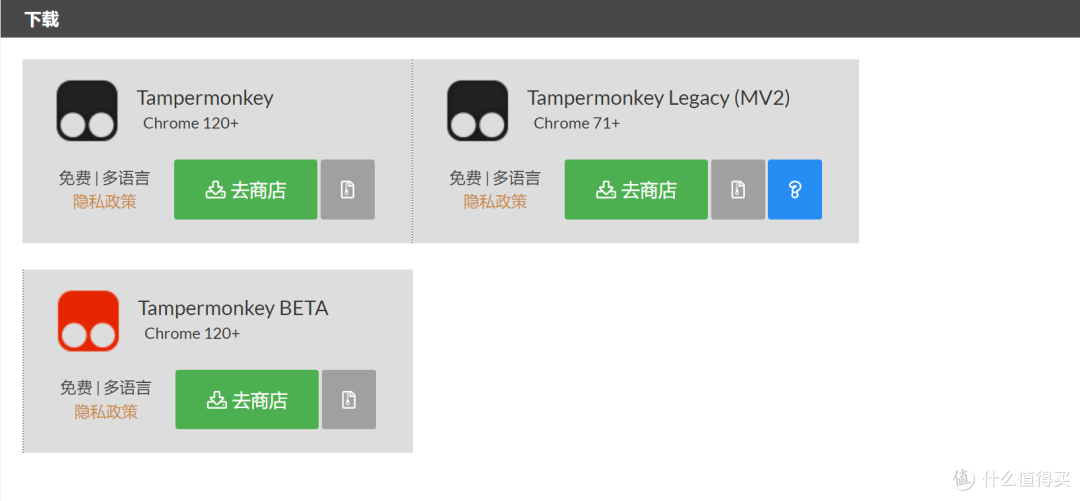
(2)安装步骤
2. 使用指南
(1)打开we❤宫`种`呺文章页面,等待页面完全加载,确保文章内容已显示

(2)页面右侧会出现两个按钮,点击「扫描媒体」按钮,1秒内显示识别结果:图片X张、视频X个、音频X个。点击「一键下载」按钮,等待下载进度完成,自动生成ZIP压缩包,文件名为:

四、油猴脚本代码
在AI时代,技术门槛被大大降低。你不需要成为专家,只需要成为一个好的"需求描述师",
继上期we❤在跟你开玩笑?复制的朋友圈/社群文案发了又删,删了又发,都是乱序…开发了第一款网页工具,这次分享的油猴脚本也是由我和AI协作开发完成的。
// ==UserScript==
// @name 2025最新_we❤宫`种`呺媒体文件批量下载器(宫`种`呺:掌心向暖)
// @namespace http://tampermonkey.net/
// @version 1.4
// @description 一键批量下载we❤宫`种`呺文章中的图片、视频和音频文件,适用普通长文和小绿书
// @author You
// @match https://mp.weixin.qq.com/s/*
// @grant none
// @require https://cdnjs.cloudflare.com/ajax/libs/jszip/3.10.1/jszip.min.js
// ==/UserScript==
(function() {
'use strict';
// 等待页面加载完成
window.addEventListener('load', function() {
init();
});
function init() {
// 创建按钮容器
createButtons();
}
// 创建扫描媒体和一键下载按钮
function createButtons() {
// 创建按钮容器 - 固定在页面右侧
const buttonContainer = document.createElement('div');
buttonContainer.id = 'mediaDownloadContainer';
buttonContainer.style.cssText = `
position: fixed;
top: 50%;
right: 20px;
transform: translateY(-50%);
z-index: 9999;
background: #fff;
border: 1px solid #e0e0e0;
border-radius: 8px;
box-shadow: 0 4px 12px rgba(0, 0, 0, 0.15);
padding: 15px;
width: 150px!important;
text-align: center;
`;
// 扫描媒体按钮
const scanButton = document.createElement('button');
scanButton.textContent = '扫描媒体';
scanButton.style.cssText = `
width: 100%;
margin: 8px 0;
padding: 10px 15px!important;
background: #1aad19;
color: white;
border: none;
border-radius: 6px;
cursor: pointer;
font-size: 14px;
transition: background-color 0.3s;
`;
scanButton.onclick = scanMedia;
// 添加悬停效果
scanButton.onmouseover = function() {
this.style.background = '#16941a';
};
scanButton.onmouseout = function() {
this.style.background = '#1aad19';
};
// 一键下载按钮
const downloadButton = document.createElement('button');
downloadButton.textContent = '一键下载';
downloadButton.style.cssText = `
width: 100%;
margin: 8px 0;
padding: 10px 15px!important;
background: #576b95;
color: white;
border: none;
border-radius: 6px;
cursor: pointer;
font-size: 14px;
transition: background-color 0.3s;
`;
downloadButton.onclick = downloadAllMedia;
// 添加悬停效果
downloadButton.onmouseover = function() {
this.style.background = '#4a5a82';
};
downloadButton.onmouseout = function() {
this.style.background = '#576b95';
};
// 进度显示区域
const progressDiv = document.createElement('div');
progressDiv.id = 'downloadProgress';
progressDiv.style.cssText = `
margin: 10px 0;
padding: 8px;
font-size: 12px;
color: #666;
background: #f8f8f8;
border-radius: 4px;
line-height: 1.4;
word-wrap: break-word;
display: none;
`;
buttonContainer.appendChild(scanButton);
buttonContainer.appendChild(downloadButton);
buttonContainer.appendChild(progressDiv);
// 将按钮容器添加到页面
document.body.appendChild(buttonContainer);
console.log('媒体下载器按钮已创建在页面右侧');
}
// 扫描媒体文件
function scanMedia() {
const images = getImages();
const videos = getVideos();
const audios = getAudios();
const progressDiv = document.getElementById('downloadProgress');
progressDiv.style.display = 'block';
progressDiv.innerHTML = `
扫描结果:
图片:${images.length} 张
视频:${videos.length} 个
音频:${audios.length} 个
`;
console.log('扫描结果:', { images, videos, audios });
// 3秒后自动隐藏扫描结果
setTimeout(() => {
progressDiv.style.display = 'none';
}, 3000);
}
// 获取所有图片(修改后的逻辑,兼容两种类型的文章)
function getImages() {
const images = [];
const imageUrls = []; // 用于去重
// 方式1:针对包含视频类型的文章 - 从js_content区域获取图片
const jsContent = document.getElementById('js_content');
if (jsContent) {
const imgElements = jsContent.getElementsByTagName('img');
for (let i = 0; i < imgElements.length; i++) {
const img = imgElements[i];
// 过滤条件
if (img.getAttribute('data-w') === '64') continue;
if (img.closest('.swiper_indicator_wrp_pc')) continue;
let imgUrl = '';
// 优先使用dataset.src,然后使用src
if (img.dataset.src) {
imgUrl = img.dataset.src;
} else if (img.src && !img.src.startsWith('data:')) {
imgUrl = img.src;
// 处理we❤资源链接
imgUrl = imgUrl.replace("//res.wx.qq.com/mmbizwap", "http://res.wx.qq.com/mmbizwap");
}
// 去重检查
if (!imgUrl || imageUrls.includes(imgUrl)) continue;
imageUrls.push(imgUrl);
// 根据URL判断图片格式
let extension = '.jpg'; // 默认jpg
if (imgUrl.indexOf('wx_fmt=gif') > 0 || imgUrl.indexOf('mmbiz_gif') > 0) {
extension = '.gif';
} else if (imgUrl.indexOf('wx_fmt=png') > 0 || imgUrl.indexOf('mmbiz_png') > 0) {
extension = '.png';
} else if (imgUrl.indexOf('wx_fmt=bmp') > 0 || imgUrl.indexOf('mmbiz_bmp') > 0) {
extension = '.bmp';
} else if (imgUrl.indexOf('wx_fmt=webp') > 0 || imgUrl.indexOf('mmbiz_webp') > 0) {
extension = '.webp';
}
images.push({
url: imgUrl,
filename: image_${images.length + 1}${extension}
});
}
// 如果从js_content找到了图片,直接返回
if (images.length > 0) {
return images;
}
}
// 方式2:针对小绿书类型的文章 - 查找 .swiper_item_img 下的图片
const swiperImages = document.querySelectorAll('.swiper_item_img img');
if (swiperImages.length > 0) {
swiperImages.forEach(img => {
if (img.src && !imageUrls.includes(img.src)) {
imageUrls.push(img.src);
// 获取图片扩展名
let extension = getImageExtension(img.src);
images.push({
url: img.src,
filename: image_${images.length + 1}.${extension}
});
}
});
// 如果从swiper找到了图片,直接返回
if (images.length > 0) {
return images;
}
}
// 方式3:通用方法 - 如果以上两种方式都没找到图片
const allImgElements = document.querySelectorAll('img');
allImgElements.forEach((img) => {
// 过滤条件
if (img.getAttribute('data-w') === '64') return;
if (img.closest('.swiper_indicator_wrp_pc')) return;
if (!img.src || img.src.startsWith('data:')) return;
// 去重检查
if (imageUrls.includes(img.src)) return;
imageUrls.push(img.src);
// 获取图片后缀
let extension = '.png'; // 默认png
const srcUrl = img.src;
if (srcUrl.includes('.jpg') || srcUrl.includes('.jpeg')) {
extension = '.jpg';
} else if (srcUrl.includes('.gif')) {
extension = '.gif';
} else if (srcUrl.includes('.webp')) {
extension = '.webp';
}
images.push({
url: srcUrl,
filename: image_${images.length + 1}${extension}
});
});
return images;
}
// 获取图片扩展名(从参考脚本中提取的函数)
function getImageExtension(url) {
const match = url.match(/.([a-zA-Z0-9]+)(?:?|$)/);
if (match) {
return match[1].toLowerCase();
}
// 检查we❤图片URL中的格式参数
if (url.includes('wx_fmt=')) {
const formatMatch = url.match(/wx_fmt=([a-zA-Z0-9]+)/);
if (formatMatch) {
return formatMatch[1].toLowerCase();
}
}
return 'jpg'; // 默认扩展名
}
// 获取所有视频
function getVideos() {
const videos = [];
const videoElements = document.querySelectorAll('video');
videoElements.forEach((video, index) => {
let videoUrl = video.src;
// 如果video标签没有src,查找source标签
if (!videoUrl) {
const source = video.querySelector('source');
if (source) {
videoUrl = source.src;
}
}
// 只处理we❤视频链接
if (videoUrl && videoUrl.includes('mpvideo.qpic.cn')) {
videos.push({
url: videoUrl,
filename: video_${index + 1}.mp4
});
}
});
return videos;
}
// 获取所有音频(修改后的逻辑)
function getAudios() {
const audios = [];
const audioUrls = []; // 用于去重
// 方法1:查找具有voice_encode_fileid属性的元素
const voiceElements = document.querySelectorAll('[voice_encode_fileid]');
voiceElements.forEach((element, index) => {
const voiceId = element.getAttribute('voice_encode_fileid');
if (voiceId) {
const audioUrl = https://res.wx.qq.com/voice/getvoice?mediaid=${voiceId};
// 去重检查
if (!audioUrls.includes(audioUrl)) {
audioUrls.push(audioUrl);
audios.push({
url: audioUrl,
filename: audio_${audios.length + 1}.mp3
});
}
}
});
// 方法2:查找audio标签中的we❤语音链接(作为备用方法)
const audioElements = document.querySelectorAll('audio');
audioElements.forEach((audio, index) => {
if (audio.src && audio.src.includes('res.wx.qq.com/voice')) {
// 去重检查
if (!audioUrls.includes(audio.src)) {
audioUrls.push(audio.src);
audios.push({
url: audio.src,
filename: audio_${audios.length + 1}.mp3
});
}
}
});
console.log('音频识别结果:', audios);
return audios;
}
// 下载单个文件
async function downloadFile(url, filename) {
try {
// 尝试直接fetch
let response = await fetch(url);
// 如果跨域失败,尝试通过代理或其他方式
if (!response.ok) {
throw new Error(`HTTP error! status: ${response.status}`);
}
const blob = await response.blob();
return { filename, blob, success: true };
} catch (error) {
console.error(`下载失败: ${filename}`, error);
// 尝试使用代理方式下载
try {
const proxyUrl = https://cors-anywhere.herokuapp.com/${url};
const response = await fetch(proxyUrl);
const blob = await response.blob();
return { filename, blob, success: true };
} catch (proxyError) {
console.error(`代理下载也失败: ${filename}`, proxyError);
return { filename, success: false, error: error.message };
}
}
}
// 批量下载所有媒体文件
async function downloadAllMedia() {
const progressDiv = document.getElementById('downloadProgress');
progressDiv.style.display = 'block';
progressDiv.innerHTML = '正在准备下载...';
const images = getImages();
const videos = getVideos();
const audios = getAudios();
const allFiles = [...images, ...videos, ...audios];
if (allFiles.length === 0) {
progressDiv.innerHTML = '未找到可下载的媒体文件';
setTimeout(() => {
progressDiv.style.display = 'none';
}, 3000);
return;
}
// 创建JSZip实例
const zip = new JSZip();
let downloadedCount = 0;
let failedCount = 0;
progressDiv.innerHTML = 开始下载 ${allFiles.length} 个文件...;
// 并发下载文件
const downloadPromises = allFiles.map(async (file, index) => {
const result = await downloadFile(file.url, file.filename);
if (result.success) {
zip.file(result.filename, result.blob);
downloadedCount++;
} else {
failedCount++;
console.error(`文件下载失败: ${file.filename}`);
}
// 更新进度
progressDiv.innerHTML = `
下载进度: ${downloadedCount + failedCount}/${allFiles.length}
成功: ${downloadedCount} 个
失败: ${failedCount} 个
`;
return result;
});
// 等待所有下载完成
await Promise.all(downloadPromises);
if (downloadedCount === 0) {
progressDiv.innerHTML = '所有文件下载失败,请检查网络连接或文件权限';
setTimeout(() => {
progressDiv.style.display = 'none';
}, 5000);
return;
}
// 生成压缩包
progressDiv.innerHTML = '正在生成压缩包...';
try {
const zipContent = await zip.generateAsync({ type: 'blob' });
// 获取页面标题作为压缩包名称
const title = document.title.replace(/[<>:"/|?*]/g, '_'); // 替换不合法的文件名字符
const zipFilename = ${title}.zip;
// 下载压缩包
const link = document.createElement('a');
link.href = URL.createObjectURL(zipContent);
link.download = zipFilename;
document.body.appendChild(link);
link.click();
document.body.removeChild(link);
progressDiv.innerHTML = `
下载完成!
成功: ${downloadedCount} 个
${failedCount > 0 ?
失败: ${failedCount} 个
: ''}
压缩包: ${zipFilename}
`;
// 5秒后自动隐藏完成信息
setTimeout(() => {
progressDiv.style.display = 'none';
}, 5000);
} catch (error) {
console.error('生成压缩包失败:', error);
progressDiv.innerHTML = '生成压缩包失败,请重试';
setTimeout(() => {
progressDiv.style.display = 'none';
}, 3000);
}
}
})();
以上就是本期分享,有需要的铁铁快去安装使用吧。另外,都看到这里了,如果觉得不错🙌,随手双击屏幕点个赞吧~感谢支持!!
我们下期分享见~
-END-
爱练字的96年ISTJ型互联网人/信息整合怪/工具人/影刀高级认证工程师。专注分享:RPA&AI自动化场景提效方案、效率软件安利、实用技能。
"所有的生产要素都可以被构建,只有认知是壁垒",欢迎関注 @掌心向暖
推荐阅读:
不会编程的我开发了一款近900行指令的自动化RPA应用,完美解决98%以上复制受限的飞书文档!!
作者声明本文无利益相关,欢迎值友理性交流,和谐讨论~