
























 深耕AI、数码兴趣领域












10
8
用H3做视频,怎么写?官方Skill手把手教学
2026-09-09 17:38:25
0点赞
0收藏
0评论
 封面
封面01
用 AI 生成视频,最难的一步是什么?
不是挑模型,不是调参数——是写 Prompt。
你搜"AI 视频生成",十篇教程有九篇在讲提示词技巧。但 MiniMax H3 的官方开源库里自带一个专门解决这个问题的 Skill——h3-prompt-writing,它把 H3 的 Prompt 写法拆成了公式、字段和模板,哪怕你是第一次接触视频生成,也能照着写出合格的 Prompt。
这篇文章就是对这个 Skill 的完整解读。学完你可以:文生视频、图生视频、用首尾帧控制镜头、用多模态参考锁定角色/风格/动作。5 种模式,一个 Skill,全覆盖。
02 先搞懂 H3 能做什么
在动手写 Prompt 之前,先弄清楚 H3 有几种生成模式。H3 是 MiniMax 的开源全模态音视频生成基座模型,核心能力一句话:输入文字/图片/视频/音频任意组合,输出一段最长 15 秒、带原生双声道立体声的短片,最高 2K 分辨率,24fps。
它的生成模式分为两种大类、五个分支:
基础模式(T2VA / I2VA / FL2VA / L2VA)
• T2VA(Text-to-Video):纯文字生视频,从零构建完整画面和音效。
• I2VA(Image-to-Video):以一张输入图为首帧,让画面从这里向前发展。
• FL2VA(First-and-Last-frame-to-Video):同时给首帧和尾帧,AI 负责填中间的过渡。
• L2VA(Last-frame-to-Video):给尾帧,AI 逆向推理一个合理开头,最后落在指定画面上。
全参考模式(Ref2VA)
Ref2VA 是 H3 最强大的模式:可以把多张图片、多个视频片段、多个音频片段全部作为参考条件一起喂进去,让 AI 锁定角色形象、风格走向、动作节奏、声音特征,然后生成新视频。这个模式有完整的六字段 Prompt 格式,专门用于复杂的多模态控制。
在哪里用?
H3 有三条路:
• 在线 API:MiniMax 平台(国内 platform.minimaxi.com / 海外 platform.minimax.io),直接调接口,不用本地部署。
• 在线 App:海螺 AI 网页版(hailuoai.video)或 MiniMax Hub 桌面端(hub.minimaxi.com),上传参考、填 Prompt、点生成。
• 本地部署:通过 ComfyUI(SGLang / vLLM / diffusers 也支持),把 H3-Base 模型跑在自己机器上,768p 输出完全免费。
§实际效果:本地 H3 模型跑起来是什么样
上面这些模式听起来抽象,实际跑一遍就清楚了。以下是 213 服务器(RTX 5090)本地运行 H3 的实拍示例,均为 544×960竖屏 / 24fps / 约5秒,T2VA(纯文字生视频)模式直接出图:
Prompt: A lone astronaut walks across the surface of Mars at golden hour, red dust swirling around the boots. Wide cinematic shot, real footage aesthetic.
Prompt: Tokyo neon street at night during cherry blossom season, petals falling in the rain. Neon signs reflecting on wet pavement. A woman in a red umbrella walks under glowing signs. Cinematic moody atmosphere.
Prompt: Deep underwater submarine discovery, bioluminescent creatures surround a sunken ancient temple. Divers torches reveal gold artifacts. Documentary cinematic style, blue-teal color grade.
Prompt: A giant robot awakens in a futuristic Tokyo, emergency lights flashing. Steam rising from cooling vents. Camera pans up from feet to head. Epic orchestral music swell. Anime cinematic style.
以上全部在本地 RTX 5090 上生成,每段约 5 分钟(含模型首次加载),之后复用缓存速度更快。
► 实际效果:本地 RTX 5090 运行 H3
以下视频均为 T2VA(纯文字生视频)模式,544×960 · 24fps · 约5秒,未经任何后期处理。
Mars 宇航员
Prompt: A lone astronaut walks across the surface of Mars at golden hour, red dust swirling around the boots. Wide cinematic shot.
Tokyo 霓虹夜
Prompt: Tokyo neon street at night during cherry blossom season, petals falling in the rain. Cinematic moody atmosphere.
深海潜艇古神庙
Prompt: Deep underwater submarine discovery, bioluminescent creatures surround a sunken ancient temple. Documentary cinematic style.
Tokyo 机器人觉醒
Prompt: A giant robot awakens in a futuristic Tokyo, emergency lights flashing. Steam rising from cooling vents. Anime cinematic style.
03 Skill 怎么装
h3-prompt-writing 是一个纯 Markdown 的 Prompt 技能文件,兼容所有能读本地文件的 Agent(Claude Code / Cursor / Codex / OpenAI Agent 等)。
安装命令:
npx skills add https://github.com/MiniMax-AI/MiniMax-H3 --skill h3-prompt-writing
装完之后,仓库里有两个核心参考文件:
• references/base-en.txt:T2VA / I2VA / FL2VA / L2VA 四种基础模式的写法规范
• references/ref-en.txt:Ref2VA 全参考模式的六字段写法规范
下面按模式逐一讲解。
04 基础模式:三个字段写完整
T2VA / I2VA / FL2VA / L2VA 四种模式共用同一套 Prompt 结构,分三个部分:
[首帧/尾帧对齐指令](仅 I2VA / FL2VA / L2VA 需要)
integrated_multimodal_description: [主文描写]
overall_soundscape: [环境音效]
non_diegetic_music: [背景音乐]
§字段一:integrated_multimodal_description(画面+镜头+对白)
这是 Prompt 的主体。每一段镜头用 [Shot 1] 开头(首镜无时间戳),后续镜头加时间戳 [Shot 2] At 00:03.500, ...。
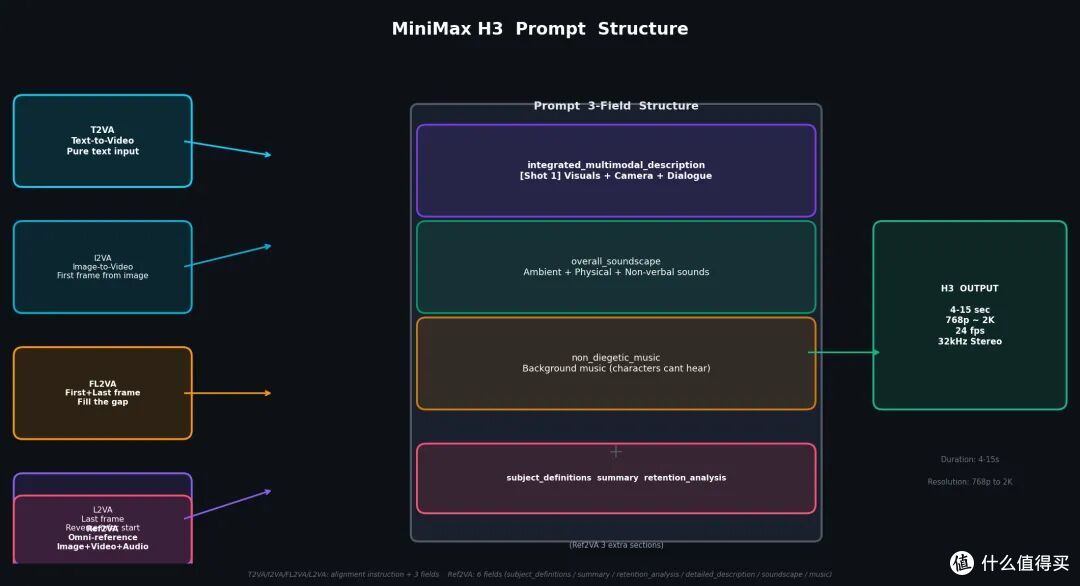 MiniMax H3 Prompt 字段结构
MiniMax H3 Prompt 字段结构
H3 的镜头语言有一套精确词汇:
运镜类型含义Zoom In / Zoom Out焦距变化,机身不动Push In / Pull Out机身前进 / 后退Pan Left / Pan Right机身固定,镜头水平转动Truck Left / Truck Right机身水平平移Tilt Up / Tilt Down机身固定,镜头垂直转动Arc Shot绕主体弧线运镜Tracking Shot跟拍移动主体Static Shot固定镜头
每种运镜可以加幅度(with small amplitude / with large amplitude)和速度(at slow speed / at fast speed),写法是自然英语动作,不是标签堆叠:
The camera pushes in with small amplitude at slow speed toward the folded letter in her hands.
对白用 [语言] 内容 格式,角色首次出现时给声线描述并配编号 (S1):
The middle-aged baker with a calm, slightly raspy voice (S1) places a fresh loaf on the wooden counter and says: [English] First batch of the morning.
§字段二:overall_soundscape(环境音效)
用 1–4 句话描述全片环境声、动作声、非语言人声,比如脚步声、风雨声、碰撞声、交通声。对白、演唱、BGM 不在此字段描述。
overall_soundscape: Wooden shutters scrape open over a quiet street as trays clink softly inside the bakery. The doorbell rings once, followed by light footsteps and the crisp sound of bread being sliced.
§字段三:non_diegetic_music(背景音乐)
只描述观众能听到、角色听不到的音乐。说清楚乐器、节奏、动态变化,不要用"悲伤""欢快"这类情绪词。
non_diegetic_music: Sparse piano notes at a slow tempo, joined by sustained low strings that gradually increase in volume before fading out.
如果整片不要 BGM,写 N/A。
05 实录:写一个 FL2VA Prompt
比干讲字段更有效的办法是看一个真实案例。以下是一段 8 秒单镜头 FL2VA Prompt(首帧→尾帧自行车手撑伞):
How the reference pictures align with the target video — Picture 1 (from Shot 1) aligns with the 0.00-second mark of the target video; Picture 2 (from Shot 1) aligns with the 8.00-second mark of the target video.

integrated_multimodal_description: [Shot 1] Live-action, cinematic, a rain-soaked cyclist begins in the position and framing established by Picture 1, holding a closed black umbrella beside a silver bicycle. The camera pulls out with small amplitude at slow speed as she releases the bicycle handle, raises the umbrella above her shoulder, and presses the runner upward until the canopy opens. Water rolls from the expanding fabric while she steps beneath it, rotates the handle into the final angle, and settles into the pose, spacing, and composition established by Picture 2 at the end of the shot.

overall_soundscape: Rain falls steadily on the pavement, followed by the soft rustle of fabric as the umbrella opens, the faint mechanical click of the bicycle spokes, and the distant murmur of city traffic.

non_diegetic_music: A steady acoustic guitar chord pattern at moderate tempo with soft reverb, gradually fading as the shot ends.
注意三个关键点:
1. 首帧/尾帧对齐指令放在最前面,格式固定:Picture 1 aligns with 0.00-second mark; Picture 2 aligns with 8.00-second mark。
2. 主体段不重复两张图的内容,而是写"从图1到图2之间发生了什么"——镜头运动、物体变化、姿态过渡。
3. 音效和 BGM 分开,环境声在 overall_soundscape,纯背景音乐在 non_diegetic_music。
06 全参考模式 Ref2VA:六字段精准控制
当你的需求超过"首尾两帧"——比如用一组图片定义角色外观、用一段视频锁定动作风格、用一段音频参考人声音色——就需要 Ref2VA。它的 Prompt 结构是六个字段,依次填写:
字段作用subject_definitions定义所有参考内容的标签和角色summary任务类型 + 目标视频一句话概述retention_analysis分析每个参考内容在成片中如何保留/转移detailed_description按时间顺序逐镜头描写overall_soundscape环境音效non_diegetic_music背景音乐
§Reference Label 体系
Ref2VA 有四类标签:
标签用途角色/物体/风格等可复用内容作为首帧/尾帧/构图锚点的参考图作为编辑源/时间结构参考的视频作为音色/音乐/音效参考的音频
标签一旦定义,全文统一,不可混淆。
§一个 Ref2VA 示例框架
subject_definitions:
 is the young woman in , with long dark hair, a blue cardigan, and a thin silver necklace.
 is the first frame anchor showing a woman seated beside a café window.
 is the voice-timbre reference for  (S1).

summary:
[keyframe completion + reference generation] The target video follows  walking through a rain-soaked street, with her appearance from  fully preserved and her voice timbre guided by .

retention_analysis:
 (appears in [Shot 1]): fully_preserved — appearance, clothing, and spatial position match  exactly.
: reference — the target speaker follows the voice timbre without copying the original signal.

detailed_description:
[Shot 1] Live-action, cinematic, the young woman  walks beside a rain-covered café window, her appearance and position matching . The camera trucks left with small amplitude at slow speed as she pulls her cardigan tighter and says: [English] I never expected it to rain today. ...
overall_soundscape: Steady rainfall on cobblestones, occasional car horns in the distance, and the soft rustle of her cardigan as she walks.
non_diegetic_music: A melancholic piano phrase at slow tempo, with soft reverb and no sudden dynamic changes.
Ref2VA 的精髓在于:你在 subject_definitions 里精确告诉 AI "这个参考是什么、起什么作用",在 retention_analysis 里说明"哪些保留、哪些改变",AI 就能在生成时精准执行,不会乱发挥。
07 ComfyUI 本地部署:768p 完全免费跑
不想每次都走 API、想要完全本地生成?H3 支持 ComfyUI 本地部署,768p 输出零费用。
安装步骤:
1. 更新 ComfyUI 到 0.3.0 以上。
2. 在 Template Library → Video 里找到任意 MiniMax H3 工作流,按弹窗提示下载模型。
3. 运行工作流。
模型托管在 HuggingFace 的 Comfy-Org/MiniMax-H3[1] 仓库,ComfyUI 自动下载所需组件。
提速:加装 Sage Attention
H3 的示例工作流默认用标准注意力实现。如果你有支持的显卡(PyTorch + CUDA 对应版本),可以加装 Sage Attention[2] 将生成速度提升约一倍:
1. 从 GitHub Releases 下载匹配你 PyTorch/CUDA 版本的 wheel,pip install 安装。
2. 安装 KJNodes[3] 自定义节点(用 ComfyUI Manager 或 git clone 到 custom_nodes/)。
3. 在工作流里加一个 Patch Sage Attention KJ 节点,连接在 UNETLoader 和 BasicGuider 之间,sage_attention 设为 auto。
4. 运行。控制台出现 "using pytorch attention instead" 是正常回退提示,不影响生成。
08 快速上手 checklist
装完 Skill、读完这篇文章,每次做 H3 视频前可以对照这个 checklist:
☐ 确定生成模式:纯文字(T2VA)?图生视频(I2VA)?首尾帧(FL2VA)?全参考(Ref2VA)?
☐ Ref2VA 模式下:先在 subject_definitions 定义所有 、、、 标签
☐ integrated_multimodal_description 或 detailed_description 写完检查:镜头有时间戳吗?运镜有类型+幅度+速度吗?对白有语言标签吗?
☐ 环境声和 BGM 分开了吗?(overall_soundscape vs non_diegetic_music)
☐ 时长对上了吗?(H3 支持 4–15 秒,尾帧对齐时间要精确到 S.SS 两位小数)
☐ 参考标签全文一致吗?( 不能一会儿指图A一会儿指图B)
09 工具在变,方法论不变
AI 视频生成的工具更新很快——今天你用 H3,明天可能又有新模型。但 H3 的 h3-prompt-writing Skill 教的不只是"H3 怎么用",是一套视频 Prompt 的方法论:镜头语言怎么写、音效和 BGM 怎么分、参考内容怎么定义和追踪。
这套方法论是通用的。学会它,换任何支持类似格式的视频生成模型,你都能快速上手。
Skill 在 GitHub,一行命令装好,不需要任何 API Key,不需要任何付费。云端直接用,本地免费跑。
npx skills add https://github.com/MiniMax-AI/MiniMax-H3 --skill h3-prompt-writing
下一步:找一张图,或者写一段文字,试着自己写一个 H3 Prompt。