




















 深耕数码兴趣领域












2
3
黑群晖:DSM 7.X 如何有效解决扩容存储空间?
2025-08-01 18:52:34
0点赞
0收藏
2评论
本文仅适用于采用ESXI部署的黑群晖储存空间扩容。
后半部分的命令,可适用于基于linux的系统。
为什么会出现需要扩容的情况?
开工
1.正常关闭黑群晖
2.登录esxi控制台,选择黑群晖的虚拟机——编辑设置——编辑磁盘——输入新的容量大小(只能增大,不能减少)——保存。
3.启动黑群晖,进入后台界面,通过储存管理器,你会发现HDD变大了,但是在储存空间中查看磁盘大小,没有发生变化。
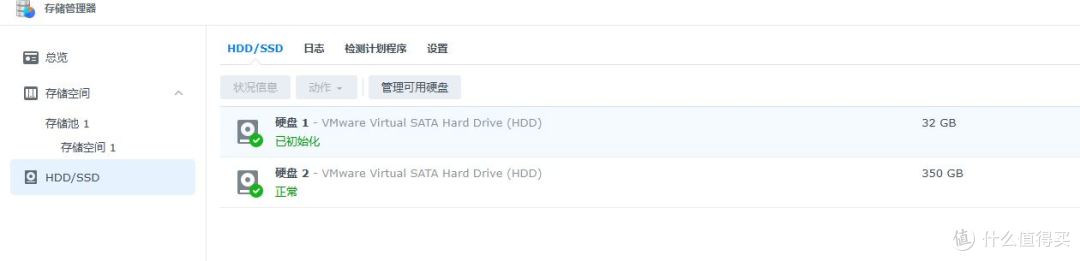
4.开启黑群晖的SSH,然后使用putty登录ssh控制台,更新磁盘分区表
命令1
列举磁盘列表
ls /dev/sa*
/dev/sata1 /dev/sata1p2 /dev/sata2p1 /dev/sata2p3
/dev/sata1p1 /dev/sata2 /dev/sata2p2 /dev/sata2p5
我们需要处理的是第二磁盘,也就是sata2
命令2
fdisk /dev/sata2
Welcome to fdisk (util-linux 2.33.2). Changes will remain in memory only, until you decide to write them. Be careful before using the write command.
Command (m for help): p
Disk /dev/sata2: 350 GiB, 375809638400 bytes, 734003200 sectors
Disk model: Virtual SATA Hard Drive Units: sectors of 1 * 512 = 512 bytes Sector size (logical/physical): 512 bytes / 512 bytes I/O size (minimum/optimal): 512 bytes / 512 bytes Disklabel type: dos Disk identifier: 0x2ed74667
Device Boot Start End Sectors Size Id Type
/dev/sata2p1 8192 16785407 16777216 8G fd Linux raid autodetect
/dev/sata2p2 16785408 20979711 4194304 2G fd Linux raid autodetect
/dev/sata2p3 21241856 419428927 398187072 189.9G f W95 Ext'd (LBA)
/dev/sata2p5 21257952 419236191 397978240 189.8G fd Linux raid autodetect
Command (m for help):
Command (m for help): quit
本次需要扩容的目标是3、5分区
命令3
parted /dev/sata2 resizepart 3 100%
Information: You may need to update /etc/fstab.
parted /dev/sata2 resizepart 5 100%
Information: You may need to update /etc/fstab.
执行后,需要手动刷新分区表,才能生效。
命令4
fdisk /dev/sata2
Welcome to fdisk (util-linux 2.33.2). Changes will remain in memory only, until you decide to write them. Be careful before using the write command.
Command (m for help): p
Disk /dev/sata2: 350 GiB, 375809638400 bytes, 734003200 sectors
Disk model: Virtual SATA Hard Drive Units: sectors of 1 * 512 = 512 bytes Sector size (logical/physical): 512 bytes / 512 bytes I/O size (minimum/optimal): 512 bytes / 512 bytes Disklabel type: dos Disk identifier: 0x2ed74667
Device Boot Start End Sectors Size Id Type
/dev/sata2p1 8192 16785407 16777216 8G fd Linux raid autodetect
/dev/sata2p2 16785408 20979711 4194304 2G fd Linux raid autodetect
/dev/sata2p3 21241856 734003199 712761344 339.9G f W95 Ext'd (LBA)
/dev/sata2p5 21257952 734003199 712745248 339.9G fd Linux raid autodetect
Command (m for help): quit
最后,使用黑群晖控制台——储存管理器——储存空间
你会发现系统提示“检测到未使用的磁盘空间,请单击立即扩充此存储池”,单击蓝色文字:“立即扩充”!
然后,磁盘空间就被立即分配成功,完成扩容操作。
END
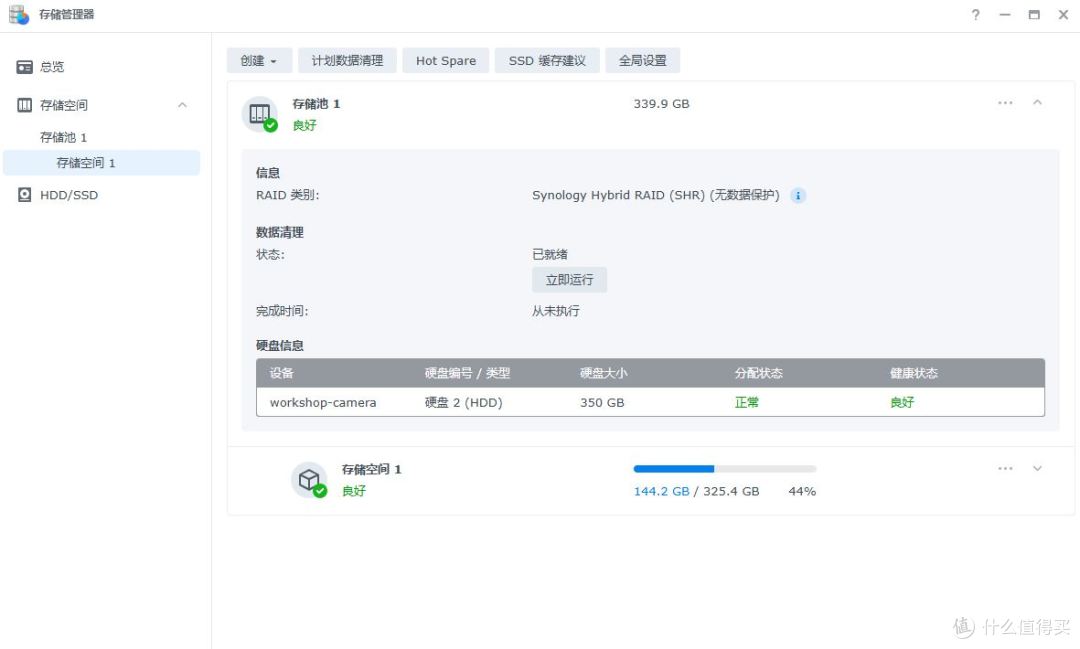
命令行操作,需谨慎,以免造成磁盘异常。
作者声明本文无利益相关,欢迎值友理性交流,和谐讨论~











校验提示文案
校验提示文案